…and we all HATE it.
what is the actual usecase of this interpolation feature? it should require capable hardware, so it doesn’t exist for nothing.
I think the idea is to increase motion resolution.
On a sample-and-hold display, like an LCD or OLED, the image on the screen stays the same for the entire frame. When the image suddenly changes because the TV displays a new frame, our eyes need a bit of time to adjust. The result is that when there is a lot of motion on screen, the image starts to look blurry.
This was not an issue on older CRT displays because they used a beam that scanned the picture. Each ‘pixel’ (CRT’s didn’t have pixels but lines, but you get the idea) would only light up for a small amount of time. Since our eyes are relatively slow we didn’t notice the flickering that much, and because it wasn’t fully lit all the time the ‘pixels’ in our eyes didn’t get saturated and could quickly adjust to the new frame.
By adding interpolated frames the image changes more often and this allows our eyes to keep up with the action. Another solution to the problem is black frame insertion, where the TV shows a black image between each frame. Again we don’t perceive this as flickering as our eyes are too slow for this, but the disadvantage is that the picture brightness seems to halve.
How much blurriness you get in motion is a function of both how fast the movement on screen is and the frame rate. Fast movement and low frame rates cause more blurriness than slow movement and high frame rates.
The use-case for this feature is mainly for fast sporting events on broadcast TV, where there may be fast movements (e.g. a soccer ball) combined with the low frame rate of broadcast TV (30 or 25 fps depending on where you are).
I suspect it’s also meant to mitigate the modern fascination with buying TVs that are too big, and sitting far too close to them all the time. If your soccer ball example involves the ball being in one position on this frame, and literally six inches away in real distance on the surface of the screen on the next, and this is happening all the time, people will get fatigued and cranky watching it for extended periods.
Unless you’re Elon Musk rich, it’s pretty much impossible to buy a TV that is too big.
I own a 77” TV and the optimal viewing distance for that is 2.7 meters for a THX recommended viewing angle of 36°. The size goes up quickly the farther you sit from the screen. If your couch is 4 meters from the screen you’re already looking at a 114” screen to get the same 36° angle.
Does anybody have any idea what this post is about?
Motion smoothing, frame interpolation features in TVs. It’s what makes movement look unnatural and on default TV settings. Old people can’t tell/don’t understand so it’s customary to sneakily disable it for them when visiting
Yes. Motion smoothing. It’s like kerning or the Wilhelm scream. Once you notice it, you’ll hate it.
It makes the slow panning forests and splashy paint videos in Currys look nice, but it makes movies and TV shows look terrible.
Eh, I’ve been adding it on purpose to technical and astronomy documentations during transcoding for my library. 23.whatever fps NTSC pulldown is just choppy.
Yeah, the way I see it if what you’re looking at is real, it might look alright. Sport, etc.
For anything with special effects, it looks like unfinished behind the scenes footage. I saw The Hobbit in high frame rate and 3D, and let me tell you, it just looked like Martin Freeman in rubber feet. Although in fairness the whole film was gash even in standard 24 fps.
Yes
I think it’s the frame interpolation feature that a lot of TVs have.
It’s a terrible effect, and people who don’t spend much time in their TV’s setup may not know or think to turn it off - or they delude themselves into thinking they like the effect.
If you’re watching a tv and the frame rate hitches all over the place every few seconds then one of these stupid fucking settings is on.
The shit wouldn’t be so fucking awful if it could actually maintain a stable frame rate but it can’t. None of them can.
Nvidia calls it DLSS and pretends its new
Wait DLSS is about upscaling right? The “features” mentioned in OP’s post are about motion interpolation that makes the video seem to be playing at higher fps than the standard 24fps used in movies and shows.
Because names mean nothing Nvidia has also labeled their frame generation as “DLSS”.
It allows more resolution by cutting the fps. Fake frames are inserted into the gaps to get the fps back.
It is all called “bullshitted pixels” and I’m having none of it.
That’s frame generation, not dlss. DLSS renders small and upscales.
It’s both. Nvidia just started calling everything DLSS, no matter how accurately it matches the actual term.
Image upscaling? DLSS. Frame generation? DLSS. Ray reconstruction? DLSS. Image downscaling? Surprisingly, also DLSS.
Frame generation is the only real odd-one-out here, the rest are using basically the same technique under the hood. I guess we don’t really know exactly what ray reconstruction is doing since they’ve never released a paper or anything, but I think it combines DLSS upscaling with denoising basically, in the same pass.
What you’re thinking of is “DLSS Super Resolution.” The other commenters are right, nVidia insists on calling all of their various upscaling schemes “DLSS” regardless of whether they’re image resolution interpolation or frame interpolation. Apparently just to be annoying.
There is a marginally handy chart on their website:

All of it is annoying and terrible regardless of what it’s called, though.
Its simply “visual noise” that tricks the viewer into thinking they are getting more of something than they are. Its a cheap inconsistent filler. Its nvidia not admitting they hit a technical wall and needing a way to force new inferior products onto the market to satisfy sales.
DLSS Frame Generation actually uses the game’s analytic motion vectors though instead of trying to estimate them (well, really it does both) so it is a whole lot more accurate. It’s also using a fairly large AI model for the estimation, in comparison to TVs probably just doing basic optical flow or something.
If it’s actually good though depends on if you care about latency and if you can notice the visual artifacts in the game you’re using it for.
Yeah, but only PC owners can have it so they think it’s good.
Shouldn’t it be more like Motion Blur?
Motion blur is consistent and reproducible using math. The other isn’t. Something that cannot produce consistent results and is sold as a solution does have a name though: snake oil.
Motion blur in video games is usually a whole lot less accurate at what it’s trying to approximate than averaging 4 frame generation frames would be. Although 4 frame generation frames would be a lot slower to compute than the approximations people normally make for motion blur.
Yes, motion blur in video games is just an approximation and usually has a lot of visible failure cases (disocclusion, blurred shadows, rotary blur sometimes). It obviously can’t recreate the effect of a fast blinking light moving across the screen during a frame. It can be a pretty good approximation in the better implementations, but the only real way to ‘do it properly’ is by rendering frames multiple times per shown frame or rendering stochastically (not really possible with rasterization and obviously introduces noise). Perfect motion blur would be the average of an infinite number of frames over the period of time between the current frame and the last one. With path tracing you can do the rendering stochastically, and you need a denoiser anyways, so you can actually get very accurate motion blur. As the number of samples approaches infinity, the image approaches the correct one.
Some academics and nvidia researchers have recently coauthored a paper about optimizing path tracing to apply ReSTIR (technique for reusing information across multiple pixels and across time) to scenes with motion blur, and the results look very good (obviously still very noisy, I guess nvidia would want to train another ray reconstruction model for it). It’s also better than normal ReSTIR or Area ReSTIR when there isn’t motion blur apparently. It’s relying on a lot of approximations too, so probably not quite unbiased path tracing quality if allowed to converge, but I don’t really know.
https://research.nvidia.com/labs/rtr/publication/liu2025splatting/
But that probably won’t be coming to games for a while, so we’re stuck with either increasing framerates to produce blur naturally (through real or ‘fake’ frames), or approximating blur in a more fake way.
I ve read the post, i ve read the comments, i have still no idea what are we talking about
The post is about when you are a tech savvy person, and go to a relative’s house for the holiday and see some piece of tech with default configuration. Often tech companies (especially TV companies) enable buzzword technology to trick non tech savvy people into believing there was an improvement where there actually wasn’t. Often, inspection with a more educated eye reveals that the result actually looks bad and ruins the original media (unless it was already terrible).
In this case the gripe is with frame smoothing technologies, which look smeared and ruin details and timing of movies. But to someone who doesn’t know better it looks like “whoa, it really is smoother, I’m gonna smooth all the smoothing with my new extra smooth smoother; the smoothness salesman sold me real smooth on this” (I’m calling out the dishonest seller, not the consumer with this).
So when the tech savvy person sees the swindled relative, they try to fix up the situation disabling the bullshit, but every brand gives it a different patented bullshit name.
It’s worth noting that inevitably, as soon as you leave the house the relatives will:
- Not notice a thin
- Call you because the TV “doesn’t do the thing it did before anymore” and you have to explain that you did it and why it’s better until they ask you to put it back
- Spend too much time trying to pot back the thing on their own, making even worse choices along the way
To actually help them you should have been involved in the choice of device, but if you ever got involved in a choice you would automatically become the designated tech purchase advisor forever and ever.
But…why don’t you just let your relatives use their things as they want?
Cause they deserve better
Or they don’t know better
So leave everything in the default settings no matter how bad?
Aah, the joys of leaving well enough alone.
Go watch any old (think Cinderella, Bambi) Disney movie on Disney+. Notice how it’s nice and sharp. It’s been upscaled. Notice how the frame rate is fast, it’s been interpolated.
Now, closely watch the edges of the lines. They are inconsistent, smeared and now you can’t not see it… Sorry
Many modern TVs are now doing this by default and it’s rarely a better experience.
You know how TV shows all look like soap operas nowadays? It’s because of goddamn motion smoothing and it is on by default on most TVs.
People who can’t tell are monsters. Blind monsters.
This post is for those of us willing to put in the work to turn it off and restore balance to the universe.
I don’t have a TV, for many many years now; so maybe that’s why
You’re the one whose tv will be fixed when family comes to visit over the holidays.
I don’t have a TV and I don’t watch movies/series.
It’s a setting in newer TVs that “smooths” frames for lower quality media to maximize the capabilities of modern TV hardware. It very rarely looks good. This post lists what the major manufacturers call the technology.
What
It’s the setting to disable on smart TVs for a better image. The option can do oone or more of the following: adds in-between frames, reduces noise, and upscales video. Sounds good, but the implementation is always terrible.
Is this what that uncanny “too smooth” look is on my parents TV? Whenever I’d go to visit them whatever they had on always looked like the camera motion or character movement was way too smooth to the point it was kind of unsettling.
The “soap opera” effect. Filmmakers hate this
Animators too. FFS, when you deliberately position a character to look fluid, life-like, and emphatic at a frame rate, you have to respect it, or you lose it! Adding frames willy-nilly ruins movies and animation. Don’t like it? Wanna be a gamer? Well, maybe just sit tight and accept that you have to trust that the artist, idfk, knew how to do their fucking job.
Personal rant here. I hate automated interpolation. I would literally prefer it if you deep-fried my work by overcompressing it over and over to ‘save space.’
Yup
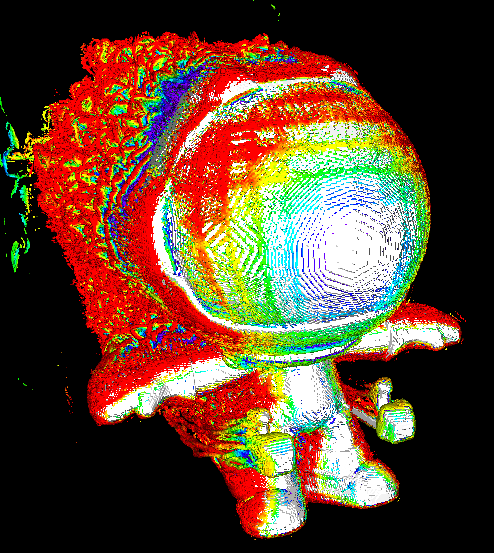
It brings you gorgeous frames like this:

Looks like the usual Aqua to me
that’s just Aqua
Aqua just looks like that.
I’ve been exposed to a smart TV only once in my life, and I hated the experience so much 😅
How is that possible in 2025?
My 55 inch rca has been going strong for a decade and it’s just monitors other than that
Maybe they were born yesterday?
I’m enjoying LG’s implementation. 🤷♂️ I have that stuff enabled, but not on the outputs where I play games.
I usually hate those too…
But they are not universally bad. OLED screens have almost instantaneous response times, which if paired with lateral movement and content shot at 24 FPS can become a stuttery mess instead of a smooth camera pan. In some movies, it’s enough to give me a headache.
In those scenarios, one of the interpolation settings available on my LG C1 instantly fixes the issue and does not add significant artifacts. The goal isn’t simulating 120 FPS on a TV show, but working around content filmed at abysmally low FPS (which was relevant when film was expensive and we used blurry TVs, not good for 2025).
Black frame insertion?
This is in regard to motion smoothing which is enabled by default on modern TVs, and give the effect of a soap opera look. People think that it makes the video look better, but it’s just adding fake frames to display at a higher frame rate. Not a lot of people like this: https://variety.com/2022/film/news/motion-smoothing-how-to-shut-off-1235176633/
To make matters worse, all TV brands have their own name for this feature. This post is saying that when you go home for the holidays, this is the name of the motion smoothing in the settings to turn off for a better viewing experience the way the filmmaker intends.
Oh god this must be what my parents have on their TV- I thought it looked that way bc it’s 4k. A soap opera look is exactly how I described it! That’s been my only exposure to new/smart TVs
I agree that it’s awful. Why do you think they enable it by default? What’s their game?
So they can turn off AI enhancements on their relatives’ TV.
I’ve been turning off smoothing for at least 15, years at this point. Not every terrible tech is AI.
To disable the “soap opera effect” on televisions.
Boomer detected.
I went to a friend’s house recently where this was enabled. I couldn’t bite my tongue for more than a few minutes before I had to bring it up. They were instantly impressed with how much better it looked lol.
My friends did that at my TV, I never noticed the difference
To further elaborate, on LG TVs it’s in the “Clarity” menu.
Thank you for not typing “TV’s”
Thank you for noticing!
How new does your TV have to be to have this? I just scrolled through settings and couldn’t find it. Is it normally in screen settings?
If it’s a smart TV, it’s probably there. Might be under a different name. I think my 6 year old Samsung calls it motion smoothing
It could be in “input settings” too, since it may be device-specific (HDMI 1 on Game mode, etc.)
My plasma “”“120"”" Hz plasma true-motion-plus enabled Panasonic had that shit and it was a decade old.
I am using a panasonic from 2008 😅
I think I’m the only person I know who doesn’t mind it.
Shit, maybe I’m old and that’s what everyone else is going to look for and turn off.
perfectly valid opinion to have with no consequences…
however, I now hate you
Unpopular opinion but generally I agree. Used it for a long time despite being someone that ‘always notices’ etc etc and honestly preferred it. Eventually turned it off though because every now and then I would be distracted by artifacts during fast movement.
This is what it did to my anime:

It’s less egregious on live action content but still noticeable
So it turns human made content into AI looking content?
Well, it uses AI to insert extra frames in between the real frames. So it doesn’t just look like AI content, it is AI content, spliced between every frame of your anime.
I’m hesitant to call it AI for the stuff available on TVs. It’s similar at some level but drastically simpler and the tech most TVs will use has been around way longer than what we’d typically call AI. Motion smoothing is usually math and algorithms we mostly could understand.
Now, if we’re talking DLSS/etc on a PC, yeah, that probably qualifies as AI but there’s a lot more that goes into that.
Or if you’re at 120hz it’s 3 frames of ai for each frame of 30fps video.
My dad was watching once upon Time in the west with true motion and I almost put him in a home then and there.
“Photography is truth. The cinema is truth 24 times per second, plus some neural frame interpolation spliced in between.”
- Jensen Godard, probably