

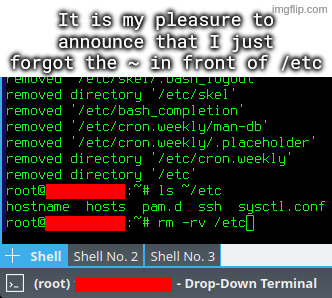
I accidentally untarred archive intended to be extracted in root directory, which among others included some files for /etc directory.
I went on to rm -rv ~/etc, but I quickly typed rm -rv /etc instead, and hit enter, while using a root account.
Your first mistake was attempting to unarchive to / in the first place. Like WTF. Why would this EVER be a sane idea?
I don’t know if it should be a bad thing. Inside the tar archive the configs were already organized into their respective dirctories, this way with
--preserve-permissions --overwriteI could just quickly add the desired versions of configs.Some examples of contents:
Keeps permissions, keeps ownership, puts things where they belong (or copies from where they were), and you end up with a single file that can be stored on whatever filesystem.
I assumed something like this. That’s a perfectly valid usecase for a tar extracted to /.
But I love it how people always jump to the assumption that the one on the other end is the stupid one
that was my reaction when I saw a coworker put random files and directories into / of a server
I feel like some people don’t have a feeling about how a file system works
Its a pretty common Windows server practice to just throw random shit on the root directory of the server. I’m guilty of this at times when there isn’t a better option available to me, but I at least use a dedicated directory at the root for dumping random crap and organize the files within that directory (and delete unneeded files when done) so that it doesn’t create more work later.
Ahh, good old /opt/
I mean, there is a home directory for the root-user, that you could use for these things.
Root’s home directory only works if you’re sshing in as root (not a great practice, although its certainly not as bad as on Windows thanks to key auth. You can simply revoke the keys of the admin you just let go rather than resetting a bunch of passwords). The reason its common practice in Windows Server administration is a combination of common practices: having dedicated admin accounts in AD for each administrator, Windows lacking a decent directory for content shared between users, and of course the general laziness that Windows administration attracts and fosters.
Maybe they do and don’t fear the HFS? I mean do you use the HFS in a docker container?
What’s so bad about that? Except that is trigger me to not have it organized.
hard to properly set permissions and organize
That makes sense if there is more than one user for a server (i.e. work environment). I would not care if it was on my home lab server, except that the root folder is deleted and remade on each boot.