A lot of these annoyances can be disabled somewhere in the Settings, but the problem is that there are so many of them tucked away all over the place. Windows 10 (I haven’t used 11) was better than Windows 8 in terms of how unified the settings were, but I remember a few instances where I had to go rummaging through the skeletons in Windows’ closet in order to change some stuff (e.g. having to go through the old-style control panel rather than the Settings).
Furthermore, Windows has the annoying habit of changing settings after updates, and it’s an unnecessary inconvenience to have to go traipsing through the settings again and again to revert unwelcome changes. Even if it’s only the minority of settings that get changed, and if those changes aren’t too frequent, it’s still draining on one’s executive function to make your PC actually behave how you want it to. People get burnt out, and then this contributes to them struggling to find the time and brain to go through changing things.
Mostly though, I am just irked that it’s necessary to go into the settings to turn this stuff off. I am a very techy person, and thus I enjoy tinkering (or perhaps "I enjoy tinkering, and thus I am a very techy person), and stuff like this annoys me so much because I know that I’m in the minority when it comes to willingness to wrestle my tech into the shape I want it. Most people won’t go to that effort, even if it’ll only take 2 minutes — the key thing here is that many of them don’t know it’ll only take a couple of minutes, and I don’t blame them for that.
Good software needs to have sensible default settings. If that were the case, then I think we’d see more non-techy people figuring out what particular settings align with their preferences. As it stands though, configuring Windows to work in a sensible manner is a Task, and the activation energy required for that means that many won’t do it.
I know I have to turn this shit off every time, and I even have a program that reverts my settings in one click. But I still forget every damn “security update” until I notice that fucking copilot is on again. I will never, ever find it acceptable for my changes to be reverted on a regular basis. When any other program fails to keep my settings, it’s a bug and it’s a bad enough one that I usually don’t use the software. But Microsoft keeps doing it on purpose and it absolutely infuriates me that there isn’t more of a backlash.
I really wish I could get more of my stuff working in Linux to make a complete switch. I don’t even need all of it; I’ll give some stuff up.
To turn off Copilot via Group Policy Editor (gpedit.msc) go to User Configuration > Administrative Templates > Windows Components > Windows Copilot. Double-click “Turn off Windows Copilot,” set it to Enabled, and restart your computer.
What kinds of things don’t work in linux? Quickemu is a great way to have a windows VM on your linux box (linux mint seems to install most nvidia drivers etc without any issues in my experience fwiw)
Smart phones do this too, and now even searching for the setting initiates an app/web search that, many times, won’t provide a link to the local setting that you’re looking for.
This without even mentioning updates that suddenly make apps uninstall-able for…reasons. Looking at you Google/Samsung.

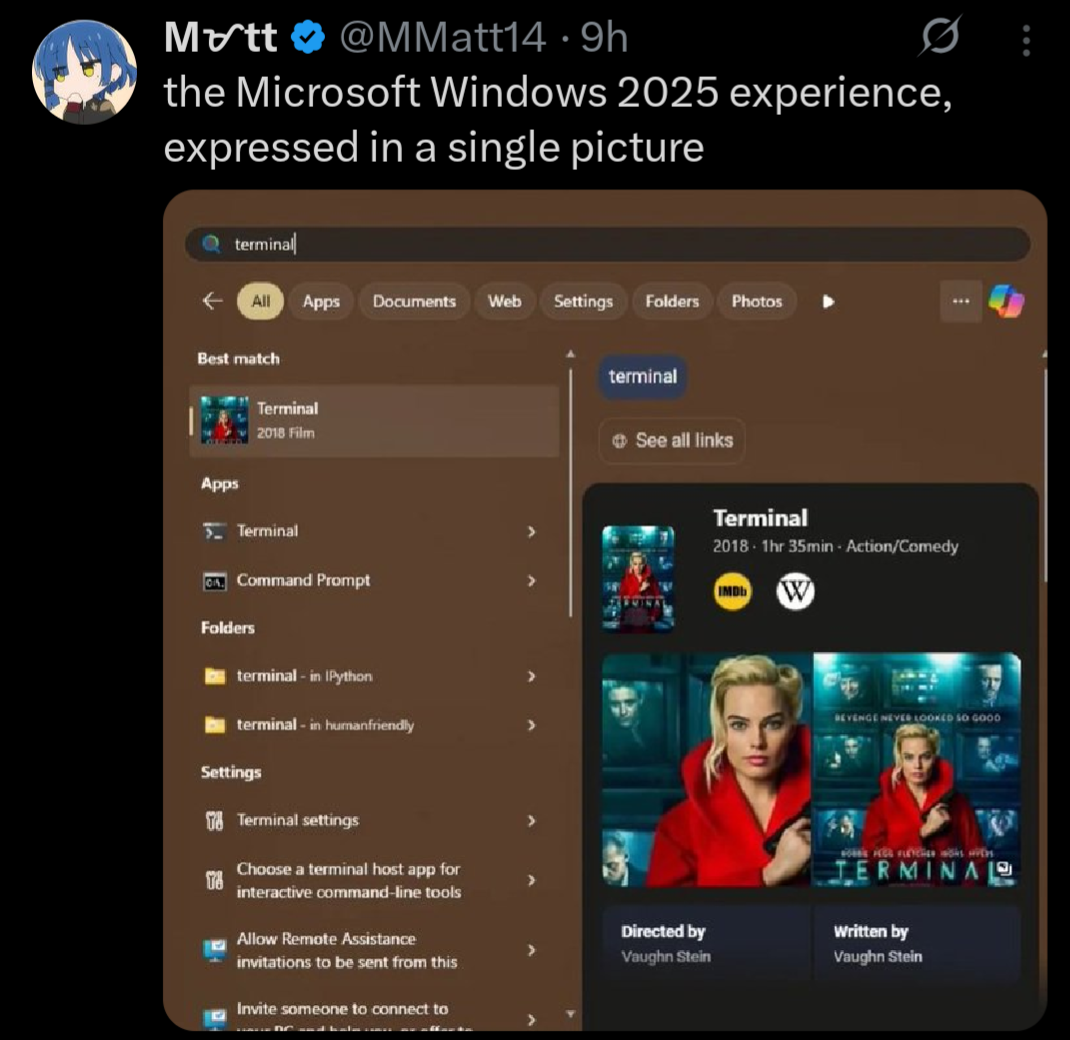
A lot of these annoyances can be disabled somewhere in the Settings, but the problem is that there are so many of them tucked away all over the place. Windows 10 (I haven’t used 11) was better than Windows 8 in terms of how unified the settings were, but I remember a few instances where I had to go rummaging through the skeletons in Windows’ closet in order to change some stuff (e.g. having to go through the old-style control panel rather than the Settings).
Furthermore, Windows has the annoying habit of changing settings after updates, and it’s an unnecessary inconvenience to have to go traipsing through the settings again and again to revert unwelcome changes. Even if it’s only the minority of settings that get changed, and if those changes aren’t too frequent, it’s still draining on one’s executive function to make your PC actually behave how you want it to. People get burnt out, and then this contributes to them struggling to find the time and brain to go through changing things.
Mostly though, I am just irked that it’s necessary to go into the settings to turn this stuff off. I am a very techy person, and thus I enjoy tinkering (or perhaps "I enjoy tinkering, and thus I am a very techy person), and stuff like this annoys me so much because I know that I’m in the minority when it comes to willingness to wrestle my tech into the shape I want it. Most people won’t go to that effort, even if it’ll only take 2 minutes — the key thing here is that many of them don’t know it’ll only take a couple of minutes, and I don’t blame them for that.
Good software needs to have sensible default settings. If that were the case, then I think we’d see more non-techy people figuring out what particular settings align with their preferences. As it stands though, configuring Windows to work in a sensible manner is a Task, and the activation energy required for that means that many won’t do it.
I know I have to turn this shit off every time, and I even have a program that reverts my settings in one click. But I still forget every damn “security update” until I notice that fucking copilot is on again. I will never, ever find it acceptable for my changes to be reverted on a regular basis. When any other program fails to keep my settings, it’s a bug and it’s a bad enough one that I usually don’t use the software. But Microsoft keeps doing it on purpose and it absolutely infuriates me that there isn’t more of a backlash.
I really wish I could get more of my stuff working in Linux to make a complete switch. I don’t even need all of it; I’ll give some stuff up.
To turn off Copilot via Group Policy Editor (gpedit.msc) go to User Configuration > Administrative Templates > Windows Components > Windows Copilot. Double-click “Turn off Windows Copilot,” set it to Enabled, and restart your computer.
It will never toggle back on.
What kinds of things don’t work in linux? Quickemu is a great way to have a windows VM on your linux box (linux mint seems to install most nvidia drivers etc without any issues in my experience fwiw)
Smart phones do this too, and now even searching for the setting initiates an app/web search that, many times, won’t provide a link to the local setting that you’re looking for.
This without even mentioning updates that suddenly make apps uninstall-able for…reasons. Looking at you Google/Samsung.