I was blocking them but decided to shunt their traffic to Nepenthes instead. There’s usually 3-4 different bots thrashing around in there at any given time.
Oh interesting! Ive done something similar but not didnt put as much effort.
For me, I just made an unending webpage that would create a link to another page…that would say bullshit. Then it would have another link with more bullshit…etc…etc…And it gets slower as time goes on.
Also made a fail2ban banning IPs that reached a certain number of links down. It worked really well, traffic is down 95% and it does not affect any real human users. Its great :)
I have a robots.txt that should tell them not to look at the sites. But if they dont want to read it, I dont want to be nice.
Perform bot detection on inbound requests (I use a regex list and one is provided below)
Configure traffic rules in your load balancer / reverse proxy to send the detected bot traffic to Nepenthes instead of the actual backend for the service(s) you run.
You’ll have to resolve my comment link on your instance since my instance is set to private now, but in case that doesn’t work, here’s the text of it:
So, I set this up recently and agree with all of your points about the actual integration being glossed over.
I already had bot detection setup in my Nginx config, so adding Nepenthes was just changing the behavior of that. Previously, I had just returned either 404 or 444 to those requests but now it redirects them to Nepenthes.
Rather than trying to do rewrites and pretend the Nepenthes content is under my app’s URL namespace, I just do a redirect which the bot crawlers tend to follow just fine.
There’s several parts to this to keep my config sane. Each of those are in include files.
An include file that looks at the user agent, compares it to a list of bot UA regexes, and sets a variable to either 0 or 1. By itself, that include file doesn’t do anything more than set that variable. This allows me to have it as a global config without having it apply to every virtual host.
An include file that performs the action if a variable is set to true. This has to be included in the server portion of each virtual host where I want the bot traffic to go to Nepenthes. If this isn’t included in a virtual host’s server block, then bot traffic is allowed.
A virtual host where the Nepenthes content is presented. I run a subdomain (content.mydomain.xyz). You could also do this as a path off of your protected domain, but this works for me and keeps my already complex config from getting any worse. Plus, it was easier to integrate into my existing bot config. Had I not already had that, I would have run it off of a path (and may go back and do that when I have time to mess with it again).
The map-bot-user-agents.conf is included in the http section of Nginx and applies to all virtual hosts. You can either include this in the main nginx.conf or at the top (above the server section) in your individual virtual host config file(s).
The deny-disallowed.conf is included individually in each virtual hosts’s server section. Even though the bot detection is global, if the virtual host’s server section does not include the action file, then nothing is done.
Files
map-bot-user-agents.conf
Note that I’m treating Google’s crawler the same as an AI bot because…well, it is. They’re abusing their search position by double-dipping on the crawler so you can’t opt out of being crawled for AI training without also preventing it from crawling you for search engine indexing. Depending on your needs, you may need to comment that out. I’ve also commented out the Python requests user agent. And forgive the mess at the bottom of the file. I inherited the seed list of user agents and haven’t cleaned up that massive regex one-liner.
# Deny disallowed user agents
if ($ua_disallowed) {
    # This redirects them to the Nepenthes domain. So far, pretty much all the bot crawlers have been happy to accept the redirect and crawl the tarpit continuously
	return 301 https://content.mydomain.xyz/;
}
Maybe I should flesh it out into an actual guide. The Nepenthes docs are “meh” at best and completely gloss over integrating it into your stack.
You’ll also need to give it corpus text to generate slop from. I used transcripts from 4 or 5 weird episodes of Voyager (let’s be honest: shit got weird on Voyager lol), mixed with some Jack Handy quotes and a few transcripts of Married…with Children episodes.


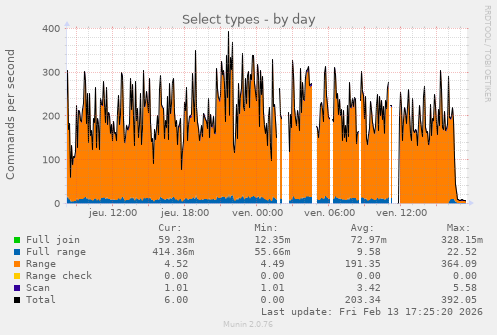
I was blocking them but decided to shunt their traffic to Nepenthes instead. There’s usually 3-4 different bots thrashing around in there at any given time.
If you have the resources, I highly recommend it.
Reference for lazy ones: https://zadzmo.org/code/nepenthes/
Oh interesting! Ive done something similar but not didnt put as much effort.
For me, I just made an unending webpage that would create a link to another page…that would say bullshit. Then it would have another link with more bullshit…etc…etc…And it gets slower as time goes on.
Also made a fail2ban banning IPs that reached a certain number of links down. It worked really well, traffic is down 95% and it does not affect any real human users. Its great :)
I have a robots.txt that should tell them not to look at the sites. But if they dont want to read it, I dont want to be nice.
Bruh if you had a live stream of this I would subscribe to your only fans.
I… I don’t know how you’d even stream that? A log of pages loaded?
Keep going I’m almost there…
That sounds like iocaine and the book of infinity
How do you do that, I’m very interested! Also good to see you Admiral!
Thanks!
Mostly there’s three steps involved:
Here’s a rough guide I commented a while back: https://dubvee.org/comment/5198738
Here’s the post link at lemmy.world which should have that comment visible: https://lemmy.world/post/40374746
You’ll have to resolve my comment link on your instance since my instance is set to private now, but in case that doesn’t work, here’s the text of it:
So, I set this up recently and agree with all of your points about the actual integration being glossed over.
I already had bot detection setup in my Nginx config, so adding Nepenthes was just changing the behavior of that. Previously, I had just returned either 404 or 444 to those requests but now it redirects them to Nepenthes.
Rather than trying to do rewrites and pretend the Nepenthes content is under my app’s URL namespace, I just do a redirect which the bot crawlers tend to follow just fine.
There’s several parts to this to keep my config sane. Each of those are in include files.
An include file that looks at the user agent, compares it to a list of bot UA regexes, and sets a variable to either 0 or 1. By itself, that include file doesn’t do anything more than set that variable. This allows me to have it as a global config without having it apply to every virtual host.
An include file that performs the action if a variable is set to true. This has to be included in the
serverportion of each virtual host where I want the bot traffic to go to Nepenthes. If this isn’t included in a virtual host’sserverblock, then bot traffic is allowed.A virtual host where the Nepenthes content is presented. I run a subdomain (
content.mydomain.xyz). You could also do this as a path off of your protected domain, but this works for me and keeps my already complex config from getting any worse. Plus, it was easier to integrate into my existing bot config. Had I not already had that, I would have run it off of a path (and may go back and do that when I have time to mess with it again).The
map-bot-user-agents.confis included in thehttpsection of Nginx and applies to all virtual hosts. You can either include this in the mainnginx.confor at the top (above theserversection) in your individual virtual host config file(s).The
deny-disallowed.confis included individually in each virtual hosts’sserversection. Even though the bot detection is global, if the virtual host’sserversection does not include the action file, then nothing is done.Files
map-bot-user-agents.conf
Note that I’m treating Google’s crawler the same as an AI bot because…well, it is. They’re abusing their search position by double-dipping on the crawler so you can’t opt out of being crawled for AI training without also preventing it from crawling you for search engine indexing. Depending on your needs, you may need to comment that out. I’ve also commented out the Python requests user agent. And forgive the mess at the bottom of the file. I inherited the seed list of user agents and haven’t cleaned up that massive regex one-liner.
deny-disallowed.conf
Thank you! I’m going to start playing with this and see what I can figure out! I’ll be referencing this frequently!
Maybe I should flesh it out into an actual guide. The Nepenthes docs are “meh” at best and completely gloss over integrating it into your stack.
You’ll also need to give it corpus text to generate slop from. I used transcripts from 4 or 5 weird episodes of Voyager (let’s be honest: shit got weird on Voyager lol), mixed with some Jack Handy quotes and a few transcripts of Married…with Children episodes.