You must log in or register to comment.
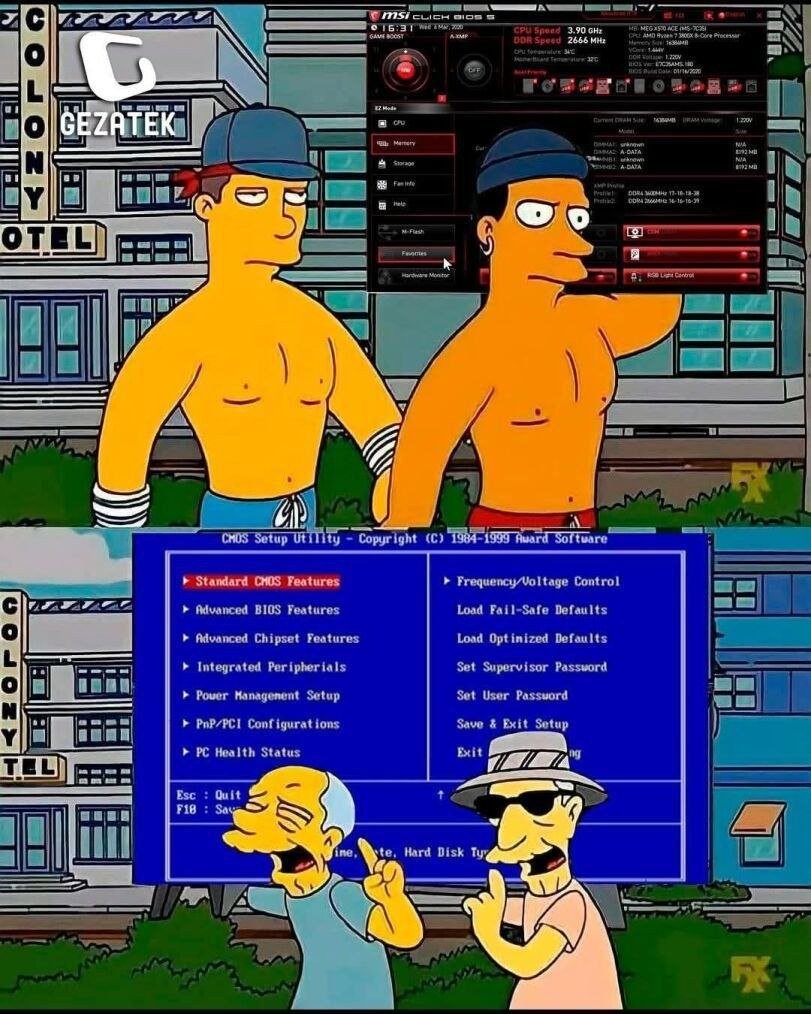
First of all, take my upvote because the meme is funny and I’m definitely the old guys at the bottom.
As for modern UEFI config utilities, they are, IMO, a huge step backwards in usability. Yeah, modern UEFI configuration utilities look flashy and provide more context / capabilities / help info, but most are a nightmare to actually use and practically force you to use a mouse.
Which would be…fine, I guess, if all mice were treated equally or consistently. Most don’t respond to the scroll wheel, so you’re dragging the scroll bar like a neanderthal. Some mice work fine, others will only move the cursor around a small area of the screen, some only move in the Y axis, some only in the X axis, some mice move the cursor at a glacial pace, others zoom it at something approaching light speed and basically just teleport the cursor from one edge of the screen to the other. And a mouse that works fine to configure a Dell may or may not work fine with an HP or even a different Dell. It’s just an obnoxious crapshoot that shouldn’t exist when we have standardized HID specs for input devices like mice.
Even on laptops, the UEFI config is often a PITA to use with the built-in pointing device(s). e.g. My ThinkPads treat the touchpad and trackpoint very differently, and neither is comfortable to use, just differently awkward.
Using the keyboard is also annoying since it’s similar to navigating in a regular GUI and having to tab through every checkbox to get to the next settings section. And (at least) Dell UEFI designers freaking love their massive arrays of checkboxes.
To wrap up my “old man yells at cloud” diatribe, I’ve always appreciated function over form and generally prefer a good TUI to a flashy GUI.
I own a repair shop so I’m sure my perspective comes from spending an unusual amount of time in UEFI/BIOS over the course of the years, but I find that they remain perfectly usable with a keyboard.
Most modern UEFI have an “advanced mode” (usually F7) that is a lot closer to traditional BIOS layout and navigability. I actually get unreasonably bothered when trainees insist on fumbling around with the mouse in “Easy Mode”
There’s so many options in modern UEFI that there are two features I’m actually incredibly grateful for:
The “Favorites” systems, so that you can have all of the settings you’ll actually change all in one place
The “Profiles” systems, so that you can easily hop between configurations
Without those, the onion meta-game of finding options that are arranged differently on AMD vs Intel or between different motherboard vendors is a rough time.
I’ll have to check for that.
For work, the only thing I typically configure via the console is the iDRAC settings and do everything else from there. But in my homelab, I’ve got a bunch of late model Optiplex USFF PCs (rising electricity rates forced me to downsize from the PowerEdges I used to run). Configuring a recent batch of those was a complete exercise in frustration, and I don’t recall seeing anything like an advanced mode listed, but TBH, I wasn’t looking for it either.
In the OEM / Laptop / Prebuilt space I’m definitely seeing move of a pivot towards graphical UEFI, that ones with forced mouse navigation are currently the exception but when I come across it I hate it.
I wish it was usable with a keyboard. Mine doesn’t power up until the os starts loading.
anyone knows what key is used for “advanced mode” on dells? i tried f7 but no worky
Everything I described relates mostly to motherboards for custom builds (ASUS, MSI, Gigabyte, etc)
Dell doesn’t have an “Advanced Mode” and profiles are limited to one “save as custom user settings” option.
Unless something has changed with their absolute latest models, their UEFI usually follows a “tree” layout that is super navigable with a keyboard. Arrow keys, spacebar, and the TAB key ought to get you everywhere you need to go - the latter being necessary to jump from the tree on the left over to managing the different settings on the right.
The bios I got on my laptop has effectively 0 keyboard navigability, no shortcut to search, scroll wheel does not work, sensibility is off, somehow only works properly with the touchpad and fails to work with a generic cheap usb mouse that as as far as I can tell is fully complaint to the usb spec as I have had 0 issues with it in any OS without the need for any custom drivers, tab navigation is effectively non functional, arrow key navigation is not there at all, there a “advanced mode” that I discovered with Dell’s custom software that allows changing bios settings from a live OS with the use of custom WMI_ACPI extensions not documented anywhere that I can find from which I can enable a hidden advanced mode that simplies showa more options in the bios but doesnt overhaul the navigation, it shows very advanced options that surely shouldnt just be shown by default such as battery charge limmit, battery start charging threshhold, and many other misceleanous settings that have no reason to be labelled as “advanced”
Give me a TUI that does not burn my eyes (i am looking at you guys who make blue TUIs!) and i am good.
UEFI/BIOS should NOT have a GUI, as it must function properly in every possible situation, and simplicity is the key.
Though mouse support is nice (support not forcing)
Yea it’s almost as if not supporting mice in the BIOS was a decision as much as it was a limitation
Wait until you see next years model, Touch Screen Only BIOS. And as an added bonus, you will need a 4k monitor to see the selections that are so small you will need tiny rat like fingers to work.
Way less usable.
Needs a toggle to show old-school/new-fruit.
I prefer that ancient American megatrends style. I find that mouse based EFI guis are always really laggy and frustrating to use with the mouse, so I end up using the keyboard anyway. Plus, I’m just here to change boot order or some random OC setting, I don’t need animations and nice graphic design. Newer bios menus just feel like a bunch of form over function when form is irrelevant.
BIOS menus with mouse support?!?!
Alright Grandma, let’s get you to bed.
I remember a time when we didn’t even have BIOSes
They did a whole WIMP BIOS design back in the Socket 7 era. AMI “WinBIOS”. I had it on a PCChips M560TG, whose most notable feature was that it cost $48 for an almost-working motherboard.

Wow! Somehow that one passed me by. Was it a rare thing?
WTF LMFAO
yeah, too much show just to turn one switch
Learning to navigate a BIOS taught me not to fear software that doesn’t work with a mouse.
But it did teach me to fear and HATE software that doesn’t work with a keyboard.
The fuck do you mean if I tab on this sidebar menu I end up on the close button on the other side of the UI???
and now I have vim plugin in browser (too dumb to setup a command line one just yet)
learning to navigate modern uis has taught me to fear software that works only with a mouse. why? Because simply it is dreadful, any modern ui has long forgotten shortcuts and traditions that I take for granted, by doing so they make themselves horrible to navigate
I have a 486 with a mouse driven BIOS…
Edit: Here is a screenshot I found online that looks like the one I have (note the 1994 copyright at the top):

The BIOS on some old Thinkpads has a bird flapping its wings as a mouse cursor.

My 560X from 1998 has one of those BIOSes, too.
I hace a 380z with that bios, it’s lovely
That Antivirus must have had the last security update decades ago lol
lol, in this case ‘update’ would require physically replacing the ROM chip on the motherboard. Sometimes they were nice enough to make it a socketed chip.
At least the attack surface is super small right now. Probably not many viruses out in the wild targeting 486s.
To be honest back in 1990 having a tui with arrow key navigation in a start up rom was pretty fucking advanced.
I don’t even get the point to the flashy BIOS interface, the thing isn’t something you should be spending much of any time in. You get in, make the change you intend to make, burn a sacrifice as an offering to the gods, and hope that it works out right.
I find the new interfaces to be less user friendly. I’m not a child: I don’t want my BIOS to look like a fucking sports car. My bed, sure, but not BIOS.
Why not both though?
in ‘gaming’ laptops people go into firmware settings to see what change increases performance of a game too often. when doing in social environment, I’ve seen people to show off their laptop by how cool the ‘inbuilt’ os looks (much like people do for their desktop environment).
The early 2010s was peak BIOS design. When I built a new PC in 2022 to replace my 2014 4th gen i5 machine, I was amazed to discover that the BIOS interface in my brand new, $500 AM5 motherboard was actually worse than the one in my old $120 board.
The old one ran at my display’s native resolution (1080p at the time), had a contemporary interface, and cool stats showing on the left and right sides of the screen. Meanwhile the BIOS in my modern PC runs at 1024x768, is mostly text-based, and so many settings are just buried several menus deep. IDK if this is an AMD problem or an AM5 problem (not a motherboard manufacturer problem cause they’re both Gigabyte boards), but it was a shock to the system for sure to see how badly the tech has regressed.
I have the same issue on Intel raptor lake, so there’s that.
BIOS menus have always been shitty in my experience in Intel and AMD, with my AMD motherboard I can only use the keyboard because the mouse input is incredibly slow and unusable, not sure how it passed QA.
I just switched to an AM5 board and at least on mine there’s a setting that enables HD resolutions, but the input works noticeably worse than on my mobo from 10 years ago.
Might be an AM5 thing or that particular board, I don’t recall these particular shortcomings in my Gigabyte 12th gen Intel mobo or my friend’s Asus AM4 mobo
BIOS and UEFI are collaborations between the mobo manufacturer and the CPU manufacturer. The CPU side of it includes things like microcode and code for moving the settings values into the registers (or other location) where they are actually used. The mobo side would be the UI itself and setting up the menus, as well as adding stuff for the other hardware components that need something set up at boot time.
Fwiw, the gigabyte AM5 mobo I use has a responsive UI in the UEFI program, and displays at a decent resolution (though probably not the native one, 1080p would be my guess). Though the mouse might be more usable because it has hardware DPI selection.
Gosh, I hate those new GUI
UEFIBIOS interfaces so much.The problem with the new ones they usually DON’T HAVE the option to change back to normal TUI-like layout.
E: one more paragraph
The new ones don’t always work with the keyboard well.
What’s the point of a software that doesn’t work well with keyboard?
(Excluding art software like GIMP/Krita.)
Both of which do have keyboard support
Honestly, if your UEFI/BIOS has mouse support it is too much. My MSI board (which I really dislike) wants you to use your mouse and it is so annoying.
I honestly don’t mind flashy and data-forward in a bios, but for fucks sake, can we get consistency?
I shouldn’t need to click a random button to go into advanced to find a half assed tree that doesn’t collapse cleanly. And can we just get a fucking save button, and if you press exit without saving it goes, hey boss, you wanna save?
It can be both visually appealing and rich in data without being overly complicated.
I do appreciate being able to use my mouse with the newer designs, though.
Anytime I tried it, the cursor was too slow and ended up using the keyboard instead.
true
Ah man I loved the Award CMOS setup screens. They were the first ones I was exposed to when DIP switches went away and I never really gelled with any others since. But god damn the new ones are hot garbage to operate.
Umm, I’m sorry to be the one to tell you, guys, but my PC has that exact BIOS screen and it’s 10 years old. They aren’t that “new”.
I had a Ryzen mobo that actually removed most of the window dressings after a bios update, because there wasn’t enough room to fit all the new cpu model names/descriptions.
that’s nice really. one of my old ones you had to chose between a or b version that had differing cpu support
I was annoyed by this the other day. Just swapped motherboards in a server machine in my house and I had to find a mouse to quickly navigate the bios.
I could have done it with the keyboard, sure, but I weighed the amount of time to fumble vs the time to dig through a drawer.
Man, who remembers when you would start up a game and have to set the dma channel and interrupt queue? Good times.
I had a boot disk that would run DR-DOS in a RAM disk because that was somehow lighter than MS-DOS’ RAM footprint so that I could free up the 1MB or so to run Doom